
-5.53%19,23,729 Clients
Flat Brokerage: ₹20/order for Intraday, Delivery and F&O| ₹0 Account Opening charges| Zero Commissions on Mutual Funds
Upstox API is a set of REST APIs (Application Programming Interface) that provides users with the required data to build a customized and complete investment and trading platform. By using Upstox API, customers can do Algo trading to create programs and codes for real-time order execution, access live market data, analyse historical data, and manage their portfolios.
Upstox API Uplink Version 2 supports 10+ languages, namely JavaScript, Python, C#, etc. Smallcase, Streak and Sensibull are the partners integrating the Upstox APIs. All requests are made over HTTPS and are sent with the "application/json" content type. Developers have the option to choose JSON or CSV response type for some API calls.
As a trader, you can create apps directly from the Upstox mobile app or desktop platform using the Apps sections on the Account tab. Go to account.upstox.com/developer/apps.
If you are a business looking to integrate the Upstox APIs, please contact the Upstox team who will create a custom app for you in no time.
| API Brokerage Charge | All trading + data APIs are free of cost. |
| API Document Link | https://upstox.com/developer/api-documentation/ |
| API Data Format | 10+ languages Javascript, Python, C#, PHP |
| API Offer Type |
|
| API Exchange Support | BSE, NSE and, MCX |
| API Support Features |
|
| API Third‑Party Tools | Amibroker |
| API Order Types | Market Order, Limit Order, Stop-loss order (SL), Stop loss Market order (SLM), After Market Order (AMO), Cover Order (CO), Bracket Order (BO), Good-Till-Date Order (GTD) Products offered:Intraday, Delivery, Cover Order, Bracket Order (One Cancels Other) |
| API Support | Upstox provides API support via live chat or by raising a ticket. |
Following is the combined rate limiting for Order Placement APIs
(Place, Modify, Cancel, Multi Order and GTT Order)
| API Type | Time Duration | Request Limit |
|---|---|---|
| Regular Algos No Algo Registration Needed |
Per second | 10 requests |
| Per minute | 500 requests | |
| Per 30 minutes | 2000 requests | |
| SEBI-Registered Algos Algo Registration Needed |
Per second | 50 requests |
| Per minute | 500 requests | |
| Per 30 minutes | 2000 requests | |
| Other Standard APIs (Holdings, Positions, Funds, Historical Candles etc.) |
Per second | 50 requests |
| Per minute | 500 requests | |
| Per 30 minutes | 2000 requests |
With just a few clicks you can create your app for free with Upstox. Below are the steps to use the Upstox API:
The existing users need to enter User ID, Password, and Year of Birth in the Upstox API Login URL to access the API services.

Upstox Interactive APIs are the trading APIs that allow users to place, modify and cancel trading orders of various types like regular orders, after-market orders, cover orders, bracket orders, and GTD orders. Upstox Trading API also helps users retrieve their positions, balance, holdings, manage user portfolios, faster order execution, and access Trade book and Trade History.
Upstox Historical API offers OHLC (Open High Low Close) historical data for a range of different time intervals ranging from 1 min to 1 month. It stores back-dated data since 2005. Upstox Historical API helps you to backtest your strategy using relevant data from the past. Users can analyze the market performance of their trading strategies and implement or modify them as per their requirements.
Upstox WebSocket API allows you to receive various types of updates like order updates, trade updates, and quote updates for all instruments across NSE, BSE, and MCX.
Upstox TradeButton API allows users to add one-click buttons to the apps or webpages that allow order placement and trade execution. You can either add Upstox branded order placement buttons or custom buttons to your webpage. The TradeButton API provides a facility for users to create a buy or sell single or basket order or mixed basket order.
Upstox API makes trading easy and convenient for traders. Let us see some examples of how Upstox APIs are useful for traders:
Example 1
The Upstox APIs connect traders directly with the stock markets and view real-time data and prices of stocks. Using Upstox API, you can book a profit on shares by selling them at a specified price even without sitting in front of the screen and tracking markets. Users can create a set of instructions through which the order gets auto executed once the stock reaches your desired target price.
Example 2
API also helps you in margin calculations. Using Upstox APIs, you can know all the margin requirements (viz. Span, Exposure, Option premium, Cash margin, VAR margin, etc.) for a list of stocks together. It becomes significant when users need to know the margins requirements for a list of securities at once as they don't need to put details of each stock one by one.
Upstox API is available to retail customers at a monthly fee.
| Upstox API | Pricing |
|---|---|
| API Trading Fee | Free |
| API Historic Fee | Free |
Yes, Upstox provides API services. However, currently, their API services are not available to new users.
Upstox has a trading API (Interactive API), Historical API, Websocket API, Tradebutton (Publisher API).
Yes. All trading and data APIs are available free of cost. Visit the documentation to explore the complete list of APIs and their features.
Steps to get Upstox API key:
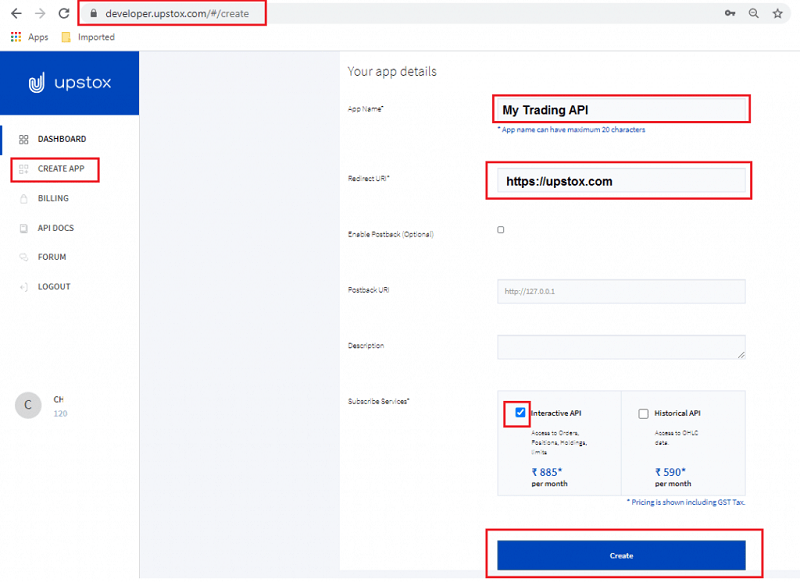
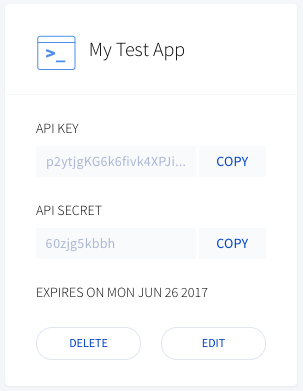
You need to generate API key, secret key, and access token to use Upstox API. Once the app gets created and API key and secret key is available, follow the below steps to use Upstox API,
Note: The Access token is valid until the next trading day.
Amibroker is a charting software that offers users the tools to backtest their strategies.
Upstox customers (closed group of users with API access) can use the third-party software Amibroker to analyze markets using multiple indicators and chart types.
Upstox has not stopped API.
As a trader, you can create apps directly from the Upstox mobile app or desktop platform using the Apps sections on the Account tab. Go to account.upstox.com/developer/apps.
If you are a business looking to integrate the Upstox APIs, please contact the Upstox team who will create a custom app for you in no time.
Information on this page was last updated on Friday, October 4, 2024
Flat Brokerage: ₹20/order for Intraday, Delivery and F&O| ₹0 Account Opening charges| Zero Commissions on Mutual Funds
Flat Brokerage: ₹20/order for Intraday, Delivery and F&O| ₹0 Account Opening charges| Zero Commissions on Mutual Funds
Compare brokers side-by-side to choose the right one.
Are you a Upstox Customer?






 Motilal Oswal
 Open Instant Account (Start Trading Today)









 Open Upstox Account