Zerodha Console Review

Published on Monday, May 12, 2025 by Chittorgarh.com Team

Zerodha Account Opening

Instant Free Account Opening| Free Equity Delivery & Mutual Funds| ₹20/trade on Intraday & F&O

India’s most trusted trading platform 💹

🔓 Open Account – FREE

⏱ 5 min | 100% Online | Paperless

Zerodha Console is the central reporting dashboard for Zerodha users, integrated into the Kite platform. It offers detailed insights into trading activities, portfolio performance, and tax-related repo.

Zerodha Console is Zerodha's back-office platform. It allows users to access account-related information, reports, statements, and analytics.

Zerodha Console is a reporting dashboard where you can view and edit your personal and banking information and monitor all your investments. Console by Zerodha offers the facility to access various reports, account statements, withdrawal requests and download contract notes.

You cannot place any trades using the console. You can place trades using Kite or other Zerodha platforms. For more information regarding Zerodha's trading platforms, click here.

Features of Zerodha Console

The following are the features of Zerodha Console:

  • Access various reports, including the trade book and the tax P&L.
  • Check real-time P&L, buy average prices, and capital gains.
  • You can make requests for fund transfers and withdrawals.
  • Monitor credits and debits in the trading account through the funds statement.
  • View and track portfolio of positions, stocks and mutual funds.
  • Download contract notes and margin statements.
  • Utilise analytics tools such as the trade book heatmap and P&L heatmap.
  • Review comprehensive details of the stocks trading from the day the trader started trading.
  • Download the tax report from the console.
  • Monitor your referral income, referral list, and earnings
  • Alerts for dividends, bonuses, splits, and buybacks.
  • Automatically adjusts your holding info post-actions.

Zerodha Console Dashboard

Zerodha Consel allows you to manage your data and monitor all your holdings. Let’s discuss the different tabs under Consel to get a better understanding:

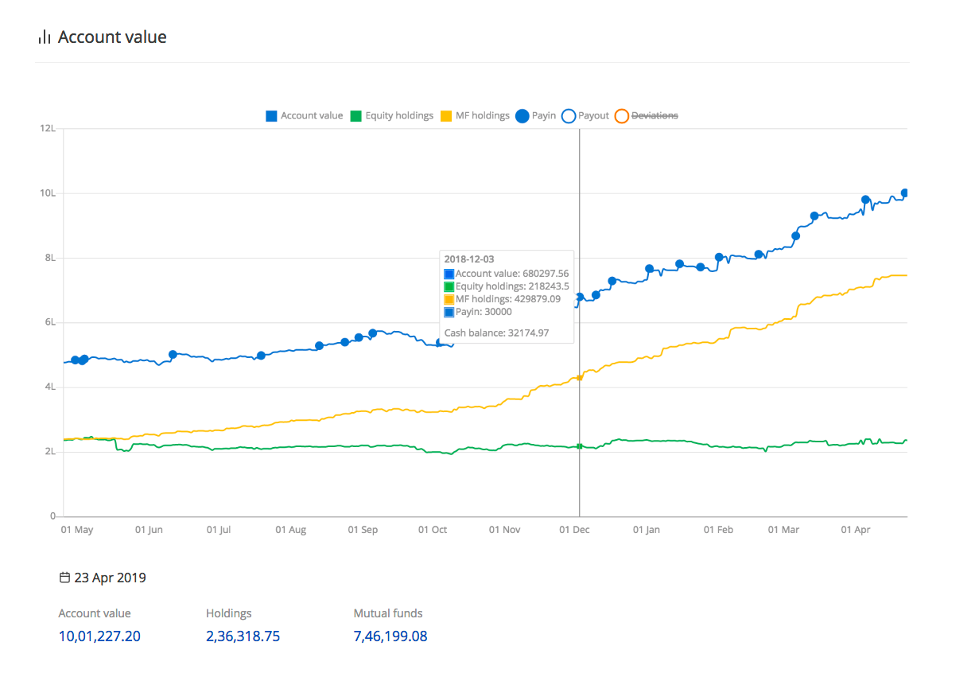
1. Dashboard

Using the Zerodha console dashboard, you can view Account Value, Holdings, Payin, Payout, and Deviation in a chart format. You can also check Account value, Equity holdings, MF Holdings, Pay-in/payout amount, and cash balance.
2. Portfolio
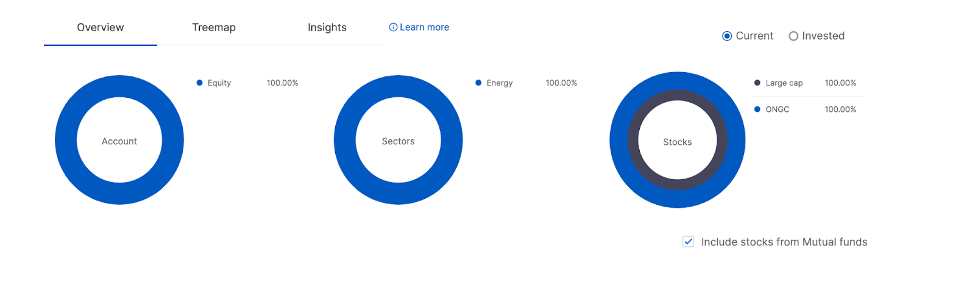
  • Zerodha Console allows you to check positions in segments (Futures, Commodities, and currency) and holdings (Invested amount, P&L, present value).
  • Check the treemap of your holdings and view sector-wise investments.
  • Create tags, for example, Retirement Fund and apply Holding to these tags, for example, add your investments in particular tags. Apply tags from P&L. Different tags for different trades in the same instrument can be added.
  • Check or read more about OFS, buybacks and takeovers.

3. Reports

Under the "Reports" section, you can generate and download various reports. Some of the commonly used reports are:
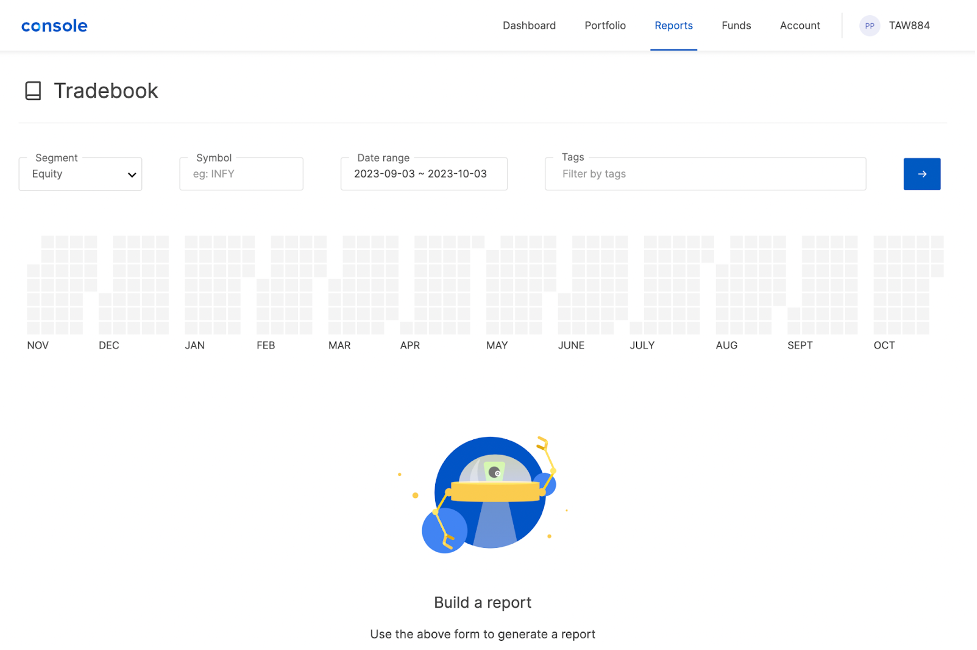
  • P&L Report: This report displays your profit and loss for a specified period.
  • Tax P&L Report: It shows the profit and loss in a format suitable for tax filing.
  • Transaction Statement: Provides a detailed list of all your transactions.
  • Margin Statement: Displays your margin utilisation for trading.

4. Funds

You can withdraw your funds and check the closing balance, unsettled credits (-), withdrawable balance, view breakdown and more.

  • Get statements of opening and closing balance.
  • Download Interest statements
  • Check the mandate details or create a new mandate.

5. Account

  • View and edit account details like personal information, bank details, email addresses, manage segments, download documents, and more.
  • Activate or deactivate trading segments on your account, such as NSE Equity, NSE Futures & Options, BSE Futures & Options, BSE Equity, and more.

Zerodha Console: Standout Back-Office Features

Zerodha Console is a comprehensive back-office platform (aka Q) that consolidates portfolio, trade, and account data with advanced analytics. Unlike many brokers, Console offers rich interactive reporting – for example, real-time P&L statements with heatmaps. Under Reports P&L, you can choose any segment (equity, F&O, etc.) and view or download combined, realized or unrealised profit/loss for a date range selected. The P&L view includes a daily “heat map” (green for gains, red for losses) to visualise performance at a glance. All corporate actions (splits, dividends, etc.) and per-trade charges are tracked so the P&L is as accurate as possible. You can tag and annotate trades (adding strategy notes or labels) using Console as a trade journal.

  • Tax-ready Reports: Under Reports Under Reports Tax P&L, Console generates downloadable, tax-ready capital gains statements by financial year and quarter. These cover equity delivery, intraday, F&O (regular/intra), and even include grandfathering details. With all your trades and holdings pre-consolidated, this greatly simplifies ITR filing.
  • Funds Management: The Funds section lets you add money via UPI (free), NEFT, or IMPS. Withdrawals initiated on Console or Kite are usually credited within 24 hours. A complete Funds Statement shows all credits/debits (brokerage, obligations, deposits) and can be downloaded in XLSX/CSV for transparency.
  • IPO Applications: IPO applications are fully online and brokerage-free. While Kite (via Profile Bids IPO) is the main route, Console also shows active IPOs under Portfolio IPOs (legacy view). Enter your UPI ID, bid price/quantity, and submit. Bids and allotments are tracked directly in Kite or Console, with no need for ASBA.
  • Tradebook & Reports: All trades are logged under Reports Tradebook. Filter by segment, date, or symbol, and download your history in Excel/CSV. This detailed ledger includes stock transfers and is ideal for performance analysis or third-party tools like Sharesight. Console also offers quick access to contract notes, margin statements, and regulatory documents.
  • Referral Dashboard & Rewards:Track referrals and rewards in Profile Rewards & Referrals. Console provides a referral link, shows how many joined, and tracks points earned (300 points per referral, usable for platforms like Sensibull or Streak). It’s more transparent than brokers who manage this offline.
  • Kite Integration & Single Login:Console and Kite are tightly linked—you log in to Console using your Kite credentials. Positions and reports sync in real time. You can switch between platforms seamlessly, and even access Console data via Kite Connect APIs, making it easier for developers to track and analyze trades.
  • Advanced Analytics & Unique Tools: Standout features include:
  • Portfolio Performance Curve (Apr 2025): See NAV-style growth of your portfolio over time and benchmark against indices like Nifty 50.
  • Stock Insights(powered by Tijori): View fundamentals and charts for each stock—P/E, dividend yield, price trends, etc.
  • Trade Tagging & Family View: Annotate trades with strategies and group up to 10 Zerodha accounts for a consolidated portfolio.
  • Stock Gifting: Transfer stocks/ETFs directly to another Zerodha user via Console—just like gifting.

Recent Enhancements: In 2025, Zerodha rolled out several Console improvements. Besides the Performance Curve above, Q1 2025 updates included automated order-slicing for large trades (in Kite), and free “Kite Connect Personal” APIs (for automated account access). The performance curve announcement noted that Zerodha has been “busy making Zerodha work better for you in Q1 2025”. In 2024, the Timeline/Insights features were added, and the Console interface has been periodically tweaked for clarity. Overall, Console’s combination of detailed reporting, tax-ready filings, one-click downloads, and unique analytics sets it apart from typical broker back-ends in India.

Zerodha Special Offer

Invest Smarter with India’s Leading Discount Broker

  • Free Account Opening (₹0 charges)
  • Zero Brokerage on Equity Delivery Trades (Free Equity Investment)
  • Flat ₹20 Pricing on intraday and F&O
  • Direct mutual funds with no commission.
  • Advanced charts, tools & insights with Kite
  • Transparent pricing with no Hidden Charges
Open FREE Zerodha Account Now!

Frequently Asked Questions

Console by Zerodha is a back-office platform that allows you to access, monitor, and update your investments, statements, funds and more. To get Console in Zerodha follow the below-mentioned steps:

  1. Click on console.zerodha.com
  2. Click on Login with Kite
  3. Add client ID and password
  4. You need to add the mobile app code
  5. Open the Kite app on your phone and you will see a 6-digit code
  6. Add a 6-digit OTP on the console website
  7. Submit and login


Following is the calculation of Account Value in Console Zerodha:

Account Value = Cash Balance + Margins Blocked + Holding Value + Pledge Value + Long Options Value - Short Options Premium

  1. Cash Balance = The Closing Balance as per the Funds Statement (ledger)
  2. Margins Blocked = SPAN + Exposure Margin Blocked
  3. Holdings = Present Value of Holdings
  4. Pledge holdings = Present Value of Pledge Holdings
  5. Long Option Value = Present Value of Long Options
  6. Short Option Premium = The Present Premium Value of Short Options


The use of Zerodha Console is free of charge. You can use the Console platform for free.

Check and track portfolio reports of positions, stocks and mutual funds. Request access to multiple reports such as trading book, tax, and P&L.

Make online transfer and withdrawal requests through the Zerodha Console.


Once you log in to the Zerodha console, you will be able to manage your trading accounts, access reports and perform various administrative functions. Below you will find all the information that will help you use the console:

  1. Login: To use Zerodha Console.
  2. Dashboard: After logging in, you'll be directed to your Dashboard. Here, you can see an overview of your holdings, account balance, and recent transactions.
  3. Funds: You can check your fund balance and transaction history, view your available balance, withdraw funds, add funds, and check your transaction history.
  4. Position: Zerodha Console allows you to check Positions in segments (Futures, Commodity and Currency) and holdings (Invested amount, P&L, Present Value).
  5. Reports: Generate various types of reports like P&L, Tax P&L, Margin Statement, and more. Check and build various reports such as Creating your reports on trades, P&L, and Tax P&L from the calendar. Download statements such as contract notes, margin statements, annual global statements, invoices, ELSS statements, and dividend statements.
  6. Account: Manage your account settings, and change your password, Profile: Update your personal details.
  7. Profile: In the "Profile" section, you can update your personal details, including email, mobile number, and other contact information. Change Password: You can change your Zerodha account password in the "Account" section. Check for rewards & referrals, Gift Stocks and more.


The Console is Zerodha's online platform where investors can review and update their account information, download investment-related documents, view their portfolio and holdings, change their bank account information, and more.


Steps to log in to the Console:

  1. Open console.zerodha.com
  2. Click on Login with Kite
  3. Add client ID and password
  4. You need to add the mobile app code
  5. Open the Kite app on your phone and you will see a 6-digit code
  6. Add a 6-digit OTP on the console website
  7. Submit and login


To create tags on the Console, follow these steps:

  1. Click Portfolio, and then click Tags.
  2. Click Manage Tags.
  3. Click New Tag.
  4. Select a colour, enter the tag name and description, and click Save.


Open an Instant Account with Zerodha