Zerodha (Flat Rs 20 Per Trade)

Invest brokerage-free Equity Delivery and Direct Mutual Funds (truly no brokerage). Pay flat Rs 20 per trade for Intra-day and F&O. Open Instant Account and start trading today.

How to apply for an IPO under shareholders quota through the Zerodha Console?

Here are the steps to apply under shareholder category through Zerodha Console:
  1. Login to Zerodha Console
  2. Click on Portfolio tab
  3. Choose 'IPO' from the drop-down list
  4. Select the IPO you want to invest 
  5. Enter your UPI ID and verify the details
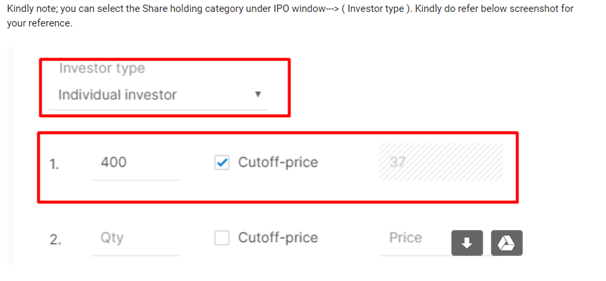
  6. Select the Investor Type as 'Share Holding Category'
  7. Put Bid and Price in the box
  8. Tick on the checkbox
  9. Click on Submit button